Selling
Custody and transfers
How a verified domain moves into SatsBid custody by an account push, what happens while it is held, how transfers in work, and how to get an unsold domain back.
On this page
Account push, not a registrar transfer#
SatsBid holds custody accounts at both Dynadot and Spaceship. A domain stays at its own registrar for the whole sale: a Dynadot domain is held in SatsBid's Dynadot account and delivered to the buyer's Dynadot account, and the same at Spaceship.
Moving a domain between two accounts at the same registrar (a push) is usually quick, needs no authorization code and does not change the expiry date.
Moving your domain into custody#
- On your verified domain's page (an active membership is needed), read the push instructions and choose Ready to transfer.
- SatsBid then shows its receiving username on that page, only to you and only for that domain. It is never shown on public pages or sent by email; please do not share it.
- Push the domain to that username at your registrar. SatsBid notices the push by itself, accepts it and checks, through the registrar and the public registry record, that the domain is in its account with the transfer lock on.
- The domain's status becomes in custody. Its nameservers are recorded (DNS is frozen while it is listed).
At Dynadot#
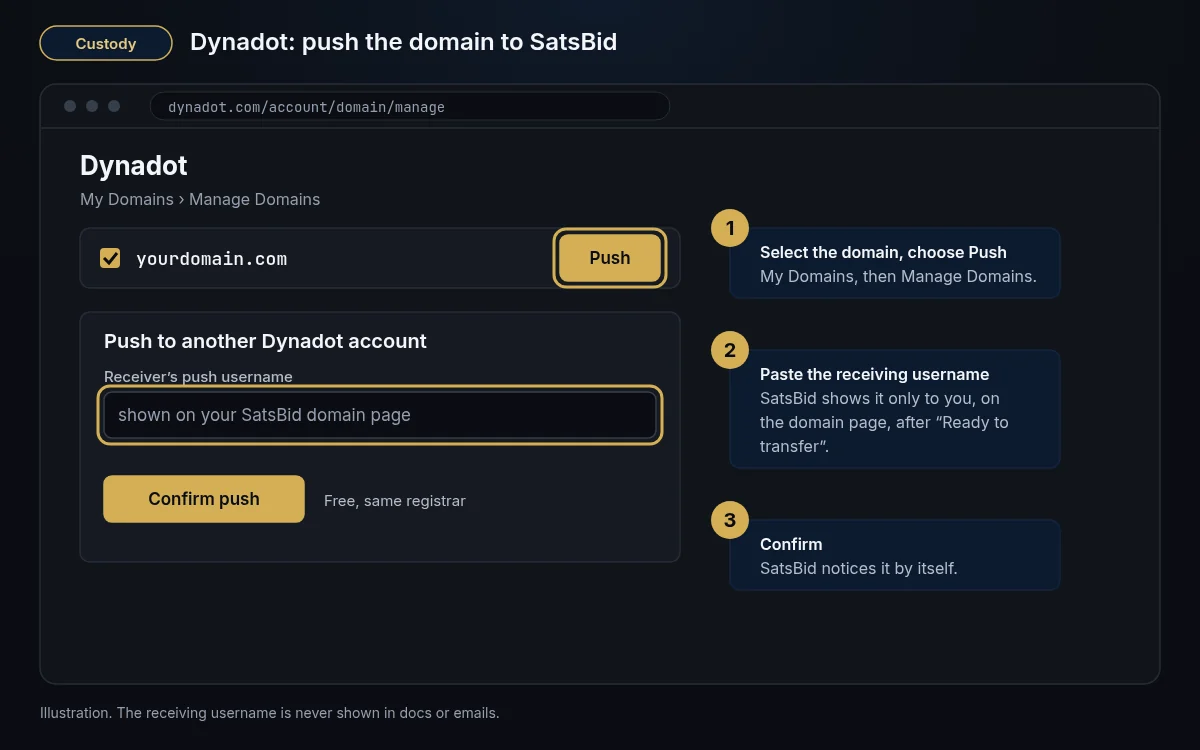
- Sign in to Dynadot and open My Domains, then Manage Domains.
- Select the domain and choose Push (move to another Dynadot account).
- Enter the receiver's push username that SatsBid shows on your domain's page after Ready to transfer. If Dynadot asks, allow it to unlock the domain for the push.
- Confirm the push. Keep the nameservers and DNS as they are while it is pending.
At Spaceship#
Spaceship moves a domain to another Spaceship customer by username:
- Sign in to Spaceship and open Domain Manager.
- Select the domain, open Transfer, then Transfer domain to another customer, and choose Transfer ownership.
- In Username (the new owner's username), enter the receiving username SatsBid shows on your domain's page after Ready to transfer.
- Under Domain contact details, keep New owner's contacts (recommended).
- Choose Proceed. This move is free. Keep the nameservers and DNS as they are while it is pending.
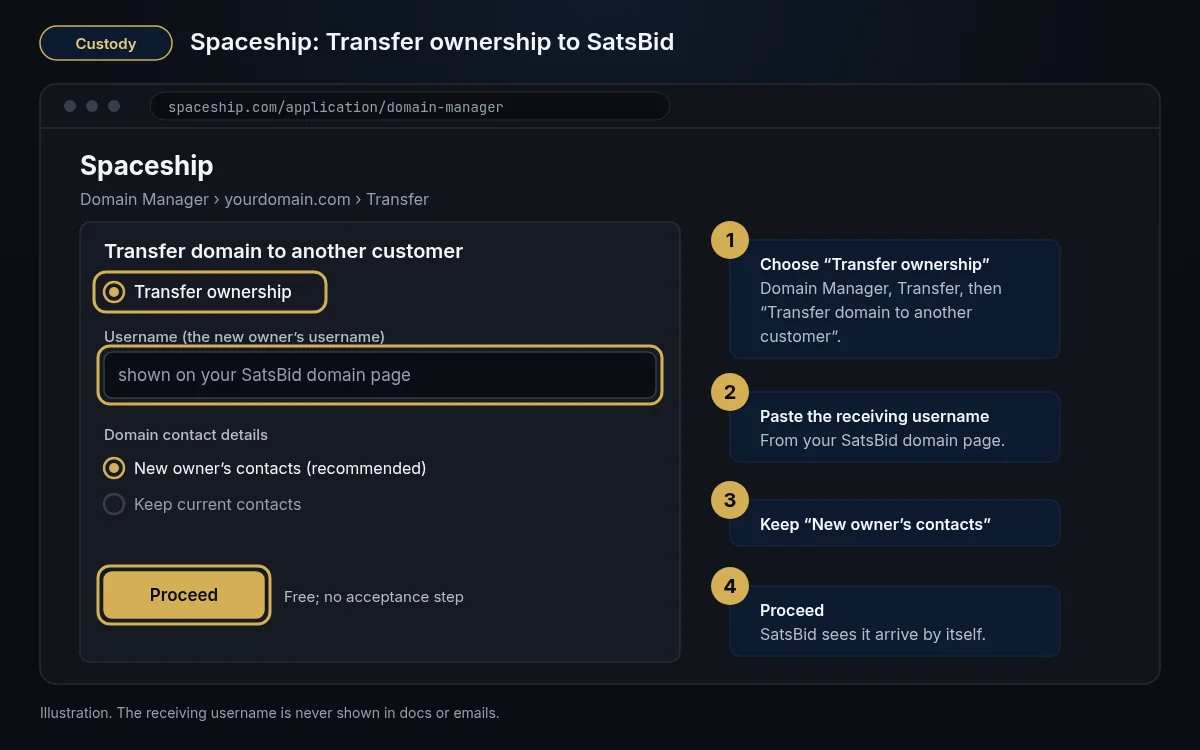
Spaceship completes the move at once: the receiving account does not have to accept it, and both accounts get a notification. SatsBid sees the domain arrive in its Spaceship account by itself, turns the transfer lock on and checks the registry.
If the domain is already in SatsBid's custody account at that registrar (for example one of SatsBid's own domains), no push is needed and the receiving username is never shown. SatsBid notices it by itself, through the registrar API, even before you choose anything: it turns the transfer lock on, records the nameservers and marks the domain in custody, all audited. The card then says Already in SatsBid custody, nothing for you to do.
The custody card always shows one current step in plain words, with a single button or instruction, and SatsBid checks in the background, so the page updates by itself. The technical part (registry record, lock state, nameservers, check history) is under Details.
To protect the custody account, each seller can start a limited number of transfers per day (15 by default) and only a few can be open at once.
A push that never reaches SatsBid lapses after 14 days; you can start again.
While in custody#
- The registrar transfer lock is on and DNS is frozen.
- Custody actions by staff need a passkey confirmation and are written to the audit log.
- Every custody account is reconciled against SatsBid's records every day. A domain that goes missing or changes registrar is suspended from sale until it is restored after a fresh check.
Transfer in from another registrar#
Transfers in are switched off at the moment: move the domain to Dynadot or Spaceship yourself first (Before you transfer). When SatsBid enables transfers in, a verified domain at another registrar can be moved into custody with its authorization (EPP) code:
- The domain page shows the steps for your registrar and the earliest possible date.
- Unlock the domain at your registrar, get the code and paste it on the domain page.
- Before sending anything, SatsBid re-checks the registry: same registrar, not locked, no transfer pending, and at least 60 days since registration or the last transfer.
- The transfer is requested at SatsBid's custody registrar and followed until it completes, then the normal custody checks run.
A transfer request stays open for 10 days. You can retry after a failure, up to 3 attempts per 30 days. Authorization codes are stored encrypted, never emailed and deleted when the transfer closes.
Getting an unsold domain back#
If a domain does not sell, or you no longer want to sell it, ask for it back from its page when it has no open auction, listing or sale. After approval, SatsBid pushes it back to your account at the same registrar and checks that it left custody.
Last updated: November 26, 2026